Rate Limits
This document describes how to configure rate limiting for Dragonfly.
The following diagram illustrates the usage of download rate limit, upload rate limit, and prefetch rate limit for the client.
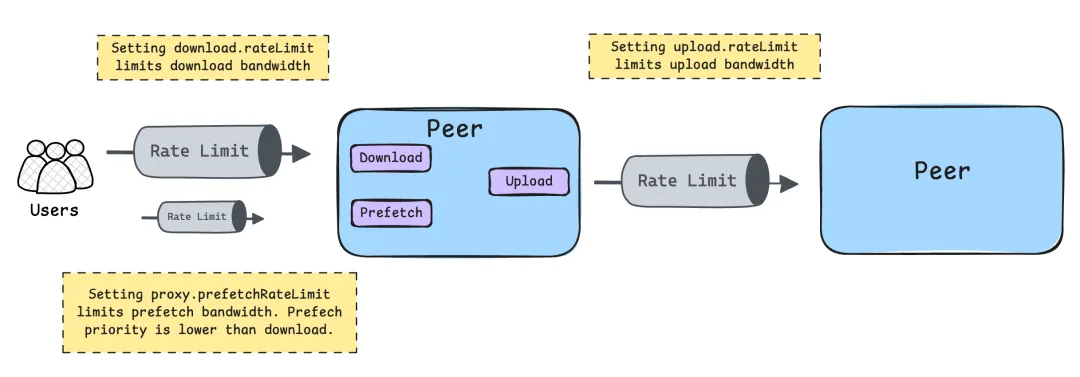
Bandwidth
Outbound Bandwidth
Used for P2P sharing of piece bandwidth.
If the peak bandwidth is greater than the default outbound bandwidth,
you can set bandwidthLimit higher to increase the upload speed.
It is recommended that the configuration be the same as the inbound bandwidth of the machine.
Please refer to dfdaemon config.
upload:
  # -- bandwidthLimit is the default rate limit of the upload speed in KB/MB/GB per second, default is 50GB/s.
  bandwidthLimit: 50GB
Inbound Bandwidth
Used for back-to-source bandwidth and download bandwidth from remote peer.
If the peak bandwidth is greater than the default inbound bandwidth,
bandwidthLimit can be set higher to increase download speed.
It is recommended that the configuration be the same as the outbound bandwidth of the machine.
Please refer to dfdaemon config.
download:
  # -- bandwidthLimit is the default rate limit of the download speed in KB/MB/GB per second, default is 50GB/s.
  bandwidthLimit: 50GB
Back To Source Bandwidth
Used to limit bandwidth specifically for downloading content directly from the source. This allows controlling the back-to-source traffic separately from P2P download traffic, which helps reduce the load on source servers and prevents overwhelming them during peak usage. Please refer to dfdaemon config.
download:
  # backToSourceBandwidthLimit is the rate limit of the back to source speed in KB/MB/GB per second, default is 50GB/s.
  backToSourceBandwidthLimit: 50GB
Prefetch Bandwidth
Download bandwidth used for prefetch requests, which can prevent network overload and reduce competition with other active download tasks, thereby enhancing overall system performance. refer to dfdaemon config.
proxy:
  # prefetchBandwidthLimit is the rate limit of the prefetch speed in KB/MB/GB per second, default is 10GB/s.
  # The prefetch request has lower priority so limit the rate to avoid occupying the bandwidth impact other download tasks.
  prefetchBandwidthLimit: 10GB
Request
Upload Request
Used to rate limit upload requests in grpc server. Please refer to dfdaemon config.
upload:
  server:
    # request_rate_limit is the rate limit of the upload request in the upload grpc server, default is 4000 req/s.
    requestRateLimit: 4000
Download Request
Used to rate limit download requests in grpc server. Please refer to dfdaemon config.
download:
  server:
    # request_rate_limit is the rate limit of the download request in the download grpc server, default is 4000 req/s.
    requestRateLimit: 4000
Adaptive
When system CPU or memory usage exceeds the configured thresholds, the limiter
estimates capacity via max_pass × min_rt × bucket_count / 1000 and sheds
incoming requests whose in-flight count exceeds this estimate. A cooldown
period prevents rapid oscillation between shedding and accepting.
Please refer to dfdaemon config.
server:
  # BBR-inspired adaptive rate limiter configuration for gRPC servers (download & upload).
  # When system CPU or memory usage exceeds the configured thresholds, the limiter
  # estimates capacity via `max_pass × min_rt × bucket_count / 1000` and sheds
  # incoming requests whose in-flight count exceeds this estimate. A cooldown
  # period prevents rapid oscillation between shedding and accepting.
  adaptiveRateLimit:
    # Number of time buckets in the rolling window for metric aggregation.
    bucketCount: 50
    # Duration of each time bucket (e.g., 200ms).
    bucketInterval: 200ms
    # CPU usage percentage threshold (0–100) above which the system is
    # considered overloaded. If threshold is 100, CPU usage is ignored
    # for overload detection.
    cpuThreshold: 100
    # Memory usage percentage threshold (0–100) above which the system is
    # considered overloaded. If threshold is 100, Memory usage is ignored
    # for overload detection.
    memoryThreshold: 90
    # Duration to continue shedding incoming requests after the first drop
    # event, preventing rapid oscillation between shedding and accepting.
    shedCooldown: 5s
    # How often the background task collects CPU/memory usage metrics.
    collectInterval: 3s