Helm Charts
Documentation for deploying Dragonfly on kubernetes using helm.
For more integrations such as Docker, CRI-O, Singularity/Apptainer, Nydus, eStargz, Harbor, Git LFS, Hugging Face, TorchServe, Triton Server, etc., refer to Integrations.
Prerequisites
| Name | Version | Document |
|---|---|---|
| Kubernetes cluster | 1.20+ | kubernetes.io |
| Helm | v3.8.0+ | helm.sh |
| containerd | v1.5.0+ | containerd.io |
Setup kubernetes cluster
Kind is recommended if no Kubernetes cluster is available for testing.
Create kind multi-node cluster configuration file kind-config.yaml, configuration content is as follows:
kind: Cluster
apiVersion: kind.x-k8s.io/v1alpha4
nodes:
  - role: control-plane
  - role: worker
  - role: worker
Create a kind multi-node cluster using the configuration file:
kind create cluster --config kind-config.yaml
Switch the context of kubectl to kind cluster:
kubectl config use-context kind-kind
Kind loads Dragonfly image
Pull Dragonfly latest images:
docker pull dragonflyoss/scheduler:latest
docker pull dragonflyoss/manager:latest
docker pull dragonflyoss/dfdaemon:latest
Kind cluster loads Dragonfly latest images:
kind load docker-image dragonflyoss/scheduler:latest
kind load docker-image dragonflyoss/manager:latest
kind load docker-image dragonflyoss/dfdaemon:latest
Create Dragonfly cluster based on helm charts
Create the Helm Charts configuration file values.yaml, and set the container runtime to containerd.
Please refer to the configuration documentation for details.
containerRuntime:
  containerd:
    enable: true
    injectConfigPath: true
    registries:
      - 'https://docker.io'

seedPeer:
  enable: true
  image:
    repository: dragonflyoss/dfdaemon
    tag: latest
  replicas: 1
  metrics:
    enable: true
  config:
    verbose: true
    pprofPort: 18066

dfdaemon:
  enable: true
  image:
    repository: dragonflyoss/dfdaemon
    tag: latest
  metrics:
    enable: true
  config:
    verbose: true
    pprofPort: 18066

jaeger:
  enable: true
Create a Dragonfly cluster using the configuration file:
$ helm repo add dragonfly https://dragonflyoss.github.io/helm-charts/
$ helm install --create-namespace --namespace dragonfly-system dragonfly dragonfly/dragonfly --version 1.1.45 -f values.yaml
NAME: dragonfly
LAST DEPLOYED: Mon Mar  4 16:23:15 2024
NAMESPACE: dragonfly-system
STATUS: deployed
REVISION: 1
TEST SUITE: None
NOTES:
1. Get the scheduler address by running these commands:
  export SCHEDULER_POD_NAME=$(kubectl get pods --namespace dragonfly-system -l "app=dragonfly,release=dragonfly,component=scheduler" -o jsonpath={.items[0].metadata.name})
  export SCHEDULER_CONTAINER_PORT=$(kubectl get pod --namespace dragonfly-system $SCHEDULER_POD_NAME -o jsonpath="{.spec.containers[0].ports[0].containerPort}")
  kubectl --namespace dragonfly-system port-forward $SCHEDULER_POD_NAME 8002:$SCHEDULER_CONTAINER_PORT
  echo "Visit http://127.0.0.1:8002 to use your scheduler"

2. Get the dfdaemon port by running these commands:
  export DFDAEMON_POD_NAME=$(kubectl get pods --namespace dragonfly-system -l "app=dragonfly,release=dragonfly,component=dfdaemon" -o jsonpath={.items[0].metadata.name})
  export DFDAEMON_CONTAINER_PORT=$(kubectl get pod --namespace dragonfly-system $DFDAEMON_POD_NAME -o jsonpath="{.spec.containers[0].ports[0].containerPort}")
  You can use $DFDAEMON_CONTAINER_PORT as a proxy port in Node.

3. Configure runtime to use dragonfly:
  https://d7y.io/docs/getting-started/quick-start/kubernetes/

4. Get Jaeger query URL by running these commands:
  export JAEGER_QUERY_PORT=$(kubectl --namespace dragonfly-system get services dragonfly-jaeger-query -o jsonpath="{.spec.ports[0].port}")
  kubectl --namespace dragonfly-system port-forward service/dragonfly-jaeger-query 16686:$JAEGER_QUERY_PORT
  echo "Visit http://127.0.0.1:16686/search?limit=20&lookback=1h&maxDuration&minDuration&service=dragonfly to query download events"
Check that Dragonfly is deployed successfully:
$ kubectl get po -n dragonfly-system
NAME                                READY   STATUS    RESTARTS   AGE
dragonfly-dfdaemon-2j57h            1/1     Running   0          92s
dragonfly-dfdaemon-fg575            1/1     Running   0          92s
dragonfly-manager-6dbfb7b47-9cd6m   1/1     Running   0          92s
dragonfly-manager-6dbfb7b47-m9nkj   1/1     Running   0          92s
dragonfly-manager-6dbfb7b47-x2nzg   1/1     Running   0          92s
dragonfly-mysql-0                   1/1     Running   0          92s
dragonfly-redis-master-0            1/1     Running   0          92s
dragonfly-redis-replicas-0          1/1     Running   0          92s
dragonfly-redis-replicas-1          1/1     Running   0          55s
dragonfly-redis-replicas-2          1/1     Running   0          34s
dragonfly-scheduler-0               1/1     Running   0          92s
dragonfly-scheduler-1               1/1     Running   0          20s
dragonfly-scheduler-2               0/1     Running   0          10s
dragonfly-seed-peer-0               1/1     Running   0          92s
dragonfly-seed-peer-1               1/1     Running   0          31s
dragonfly-seed-peer-2               0/1     Running   0          11s
Containerd downloads images through Dragonfly
Pull alpine:3.19 image in kind-worker node:
docker exec -i kind-worker /usr/local/bin/crictl pull alpine:3.19
Verify
You can execute the following command to check if the alpine:3.19 image is distributed via Dragonfly.
# Find pod name.
export POD_NAME=$(kubectl get pods --namespace dragonfly-system -l "app=dragonfly,release=dragonfly,component=dfdaemon" -o=jsonpath='{.items[?(@.spec.nodeName=="kind-worker")].metadata.name}' | head -n 1 )

# Find peer id.
export PEER_ID=$(kubectl -n dragonfly-system exec -it ${POD_NAME} -- grep "alpine" /var/log/dragonfly/daemon/core.log | awk -F'"peer":"' '{print $2}' | awk -F'"' '{print $1}' | head -n 1)

# Check logs.
kubectl -n dragonfly-system exec -it ${POD_NAME} -- grep ${PEER_ID} /var/log/dragonfly/daemon/core.log | grep "peer task done"
The expected output is as follows:
{
  "level": "info",
  "ts": "2024-03-05 12:06:31.244",
  "caller": "peer/peertask_conductor.go:1349",
  "msg": "peer task done, cost: 2751ms",
  "peer": "10.244.1.2-54896-5c6cb404-0f2b-4ac6-a18f-d74167a766b4",
  "task": "0bff62286fe544f598997eed3ecfc8aa9772b8522b9aa22a01c06eef2c8eba66",
  "component": "PeerTask",
  "trace": "31fc6650d93ec3992ab9aad245fbef71"
}
Performance testing
Containerd pull image back-to-source for the first time through Dragonfly
Pull alpine:3.19 image in kind-worker node:
docker exec -i kind-worker /usr/local/bin/crictl pull alpine:3.19
Expose jaeger's port 16686:
kubectl --namespace dragonfly-system port-forward service/dragonfly-jaeger-query 16686:16686
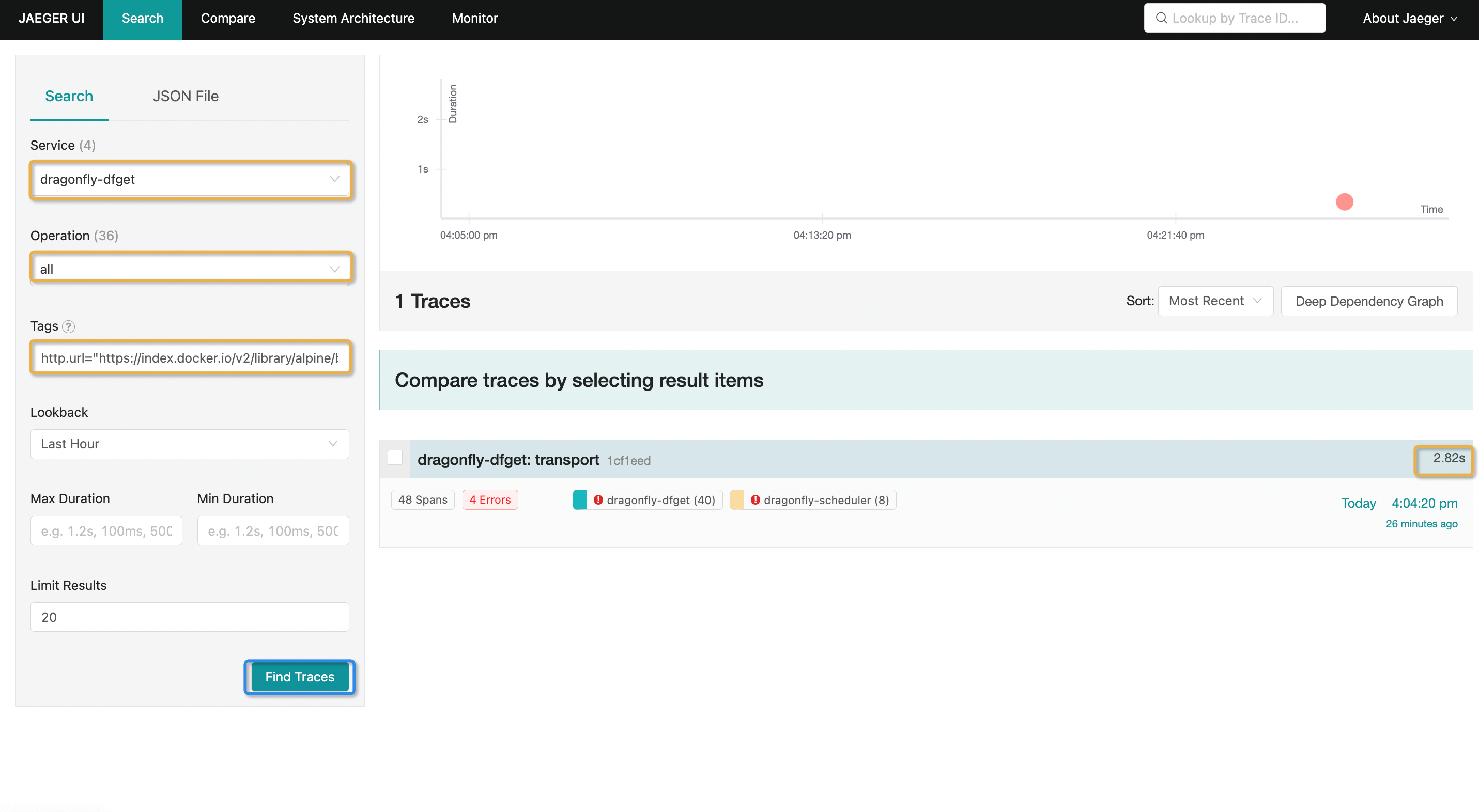
Visit the Jaeger page in http://127.0.0.1:16686/search, Search for tracing with Tags
http.url="https://index.docker.io/v2/library/alpine/blobs/sha256:ace17d5d883e9ea5a21138d0608d60aa2376c68f616c55b0b7e73fba6d8556a3?ns=docker.io":
Tracing details:
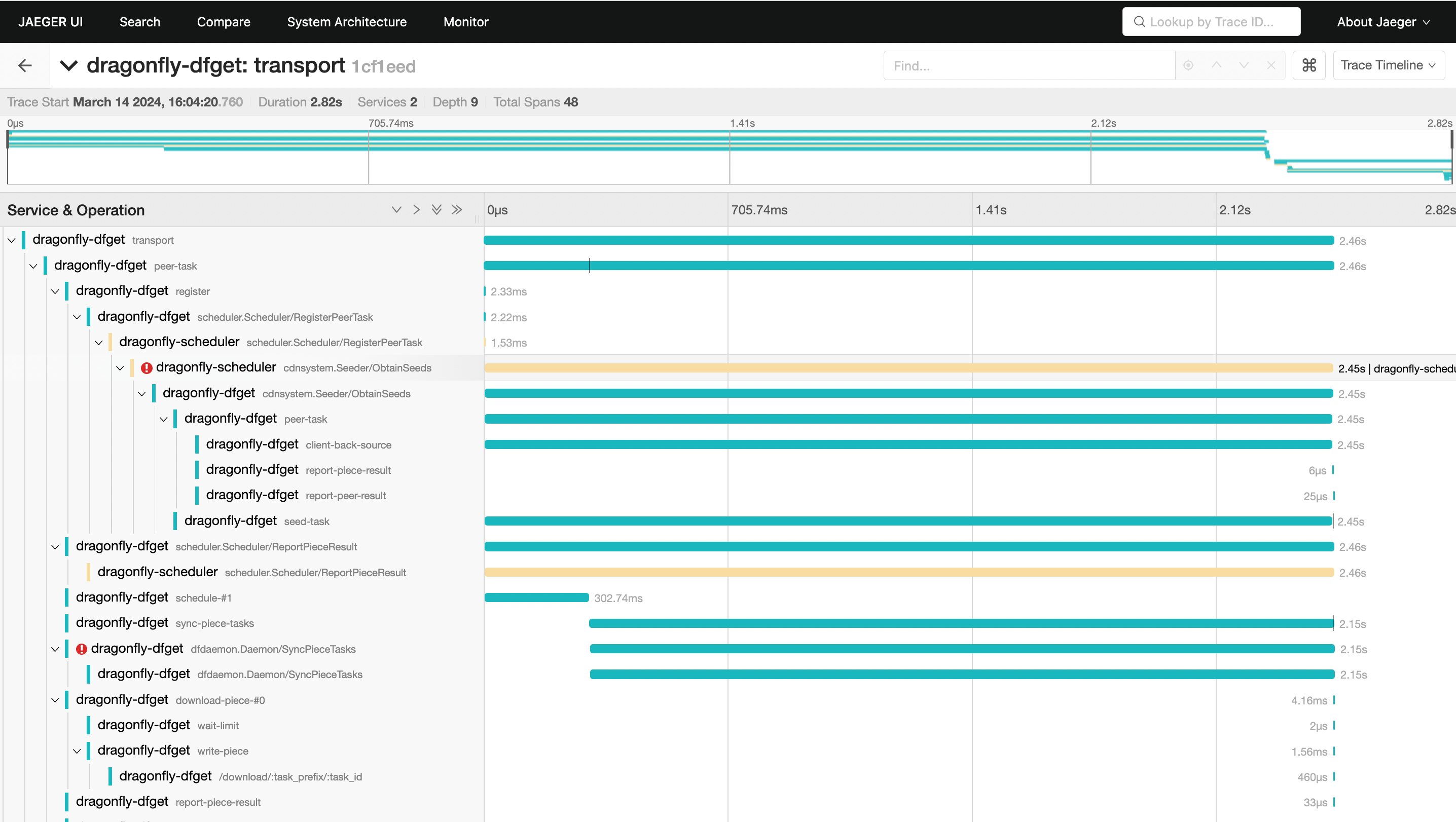
When pull image back-to-source for the first time through Dragonfly, it takes 2.82s to download the
ceba1302dd4fbd8fc7fd7a135c8836c795bc3542b9b134597eba13c75d2d2cb0 layer.
Containerd pull image hits the cache of remote peer
Delete the dfdaemon whose Node is kind-worker to clear the cache of Dragonfly local Peer.
# Find pod name.
export POD_NAME=$(kubectl get pods --namespace dragonfly-system -l "app=dragonfly,release=dragonfly,component=dfdaemon" -o=jsonpath='{.items[?(@.spec.nodeName=="kind-worker")].metadata.name}' | head -n 1 )

# Delete pod.
kubectl delete pod ${POD_NAME} -n dragonfly-system
Delete alpine:3.19 image in kind-worker node:
docker exec -i kind-worker /usr/local/bin/crictl rmi alpine:3.19
Pull alpine:3.19 image in kind-worker2 node:
docker exec -i kind-worker2 /usr/local/bin/crictl pull alpine:3.19
Expose jaeger's port 16686:
kubectl --namespace dragonfly-system port-forward service/dragonfly-jaeger-query 16686:16686
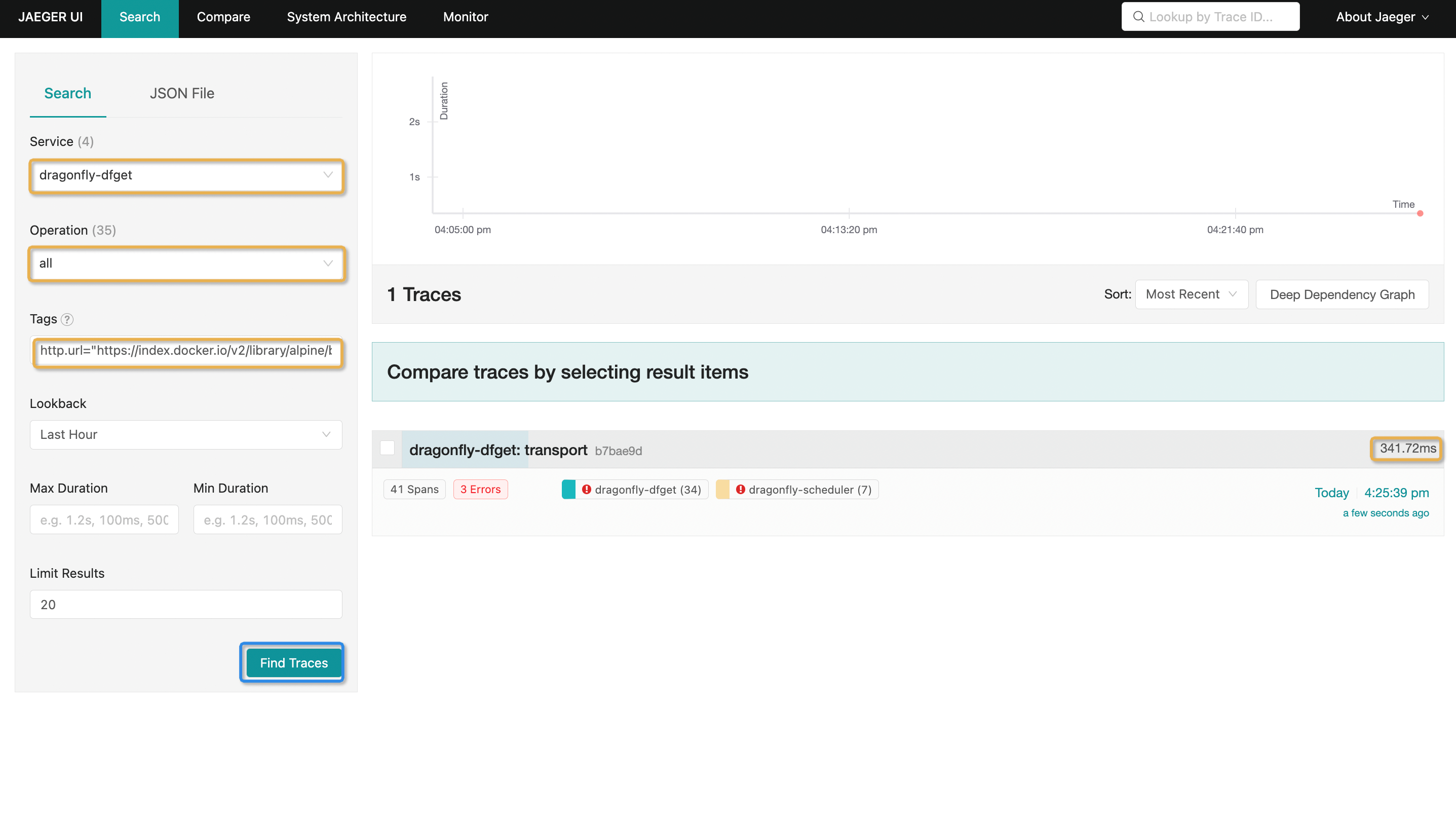
Visit the Jaeger page in http://127.0.0.1:16686/search, Search for tracing with Tags
http.url="https://index.docker.io/v2/library/alpine/blobs/sha256:ace17d5d883e9ea5a21138d0608d60aa2376c68f616c55b0b7e73fba6d8556a3?ns=docker.io":
Tracing details:
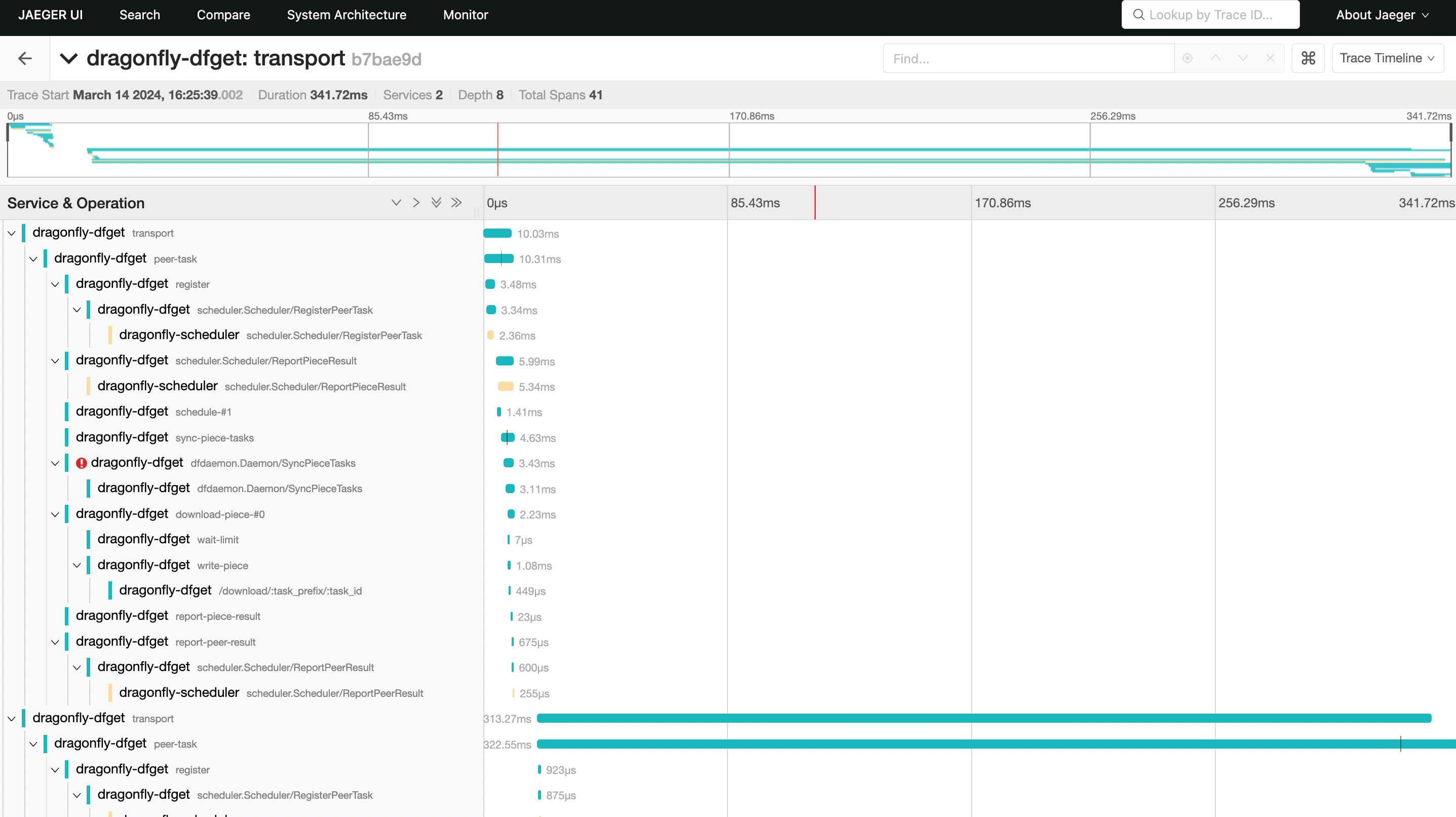
When pull image hits cache of remote peer, it takes 341.72ms to download the
ceba1302dd4fbd8fc7fd7a135c8836c795bc3542b9b134597eba13c75d2d2cb0 layer.
Containerd pull image hits the cache of local peer
Delete alpine:3.19 image in kind-worker node:
docker exec -i kind-worker /usr/local/bin/crictl rmi alpine:3.19
Pull alpine:3.19 image in kind-worker node:
docker exec -i kind-worker /usr/local/bin/crictl pull alpine:3.19
Expose jaeger's port 16686:
kubectl --namespace dragonfly-system port-forward service/dragonfly-jaeger-query 16686:16686
Visit the Jaeger page in http://127.0.0.1:16686/search, Search for tracing with Tags
http.url="https://index.docker.io/v2/library/alpine/blobs/sha256:ace17d5d883e9ea5a21138d0608d60aa2376c68f616c55b0b7e73fba6d8556a3?ns=docker.io":
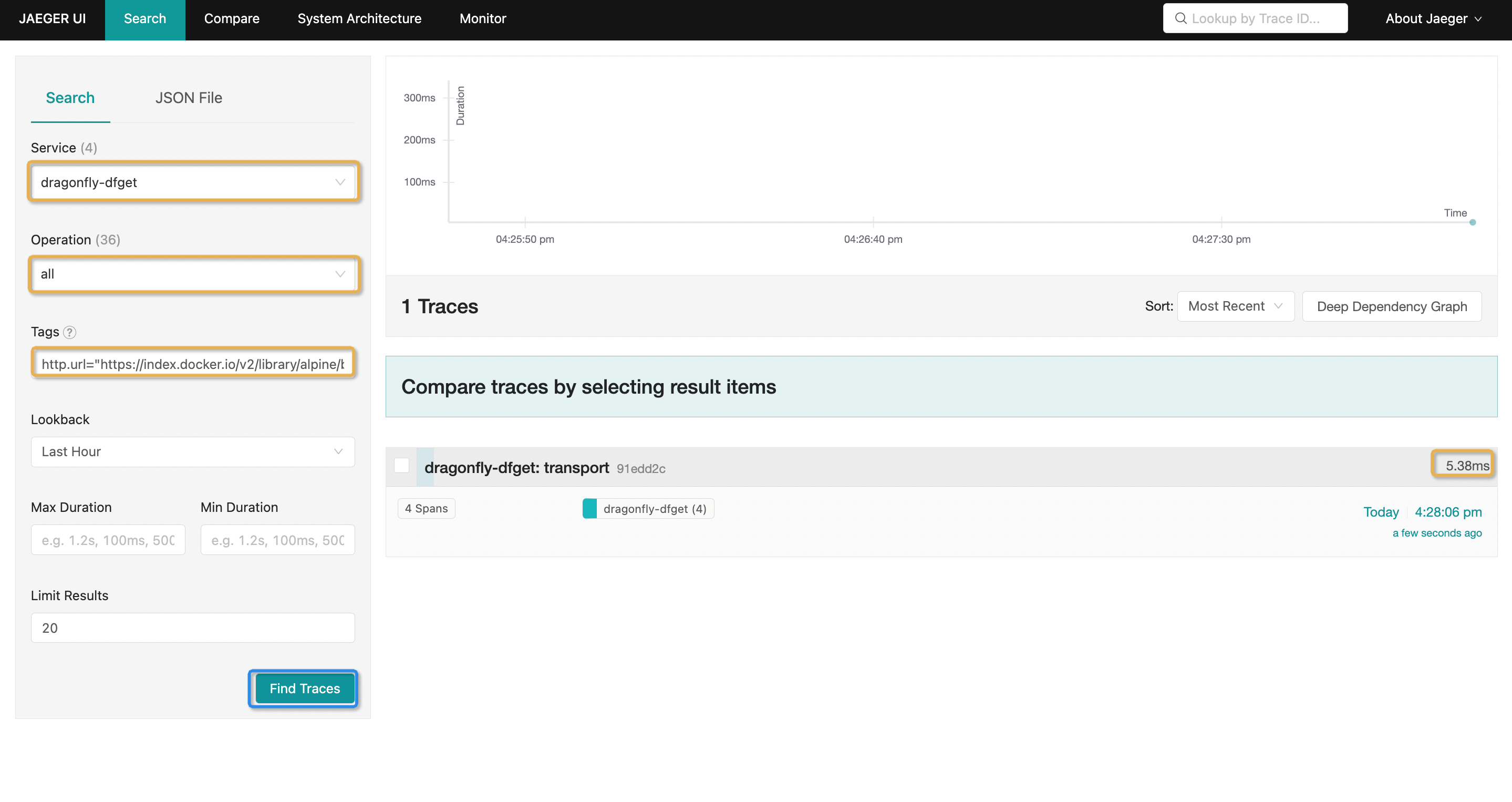
Tracing details:
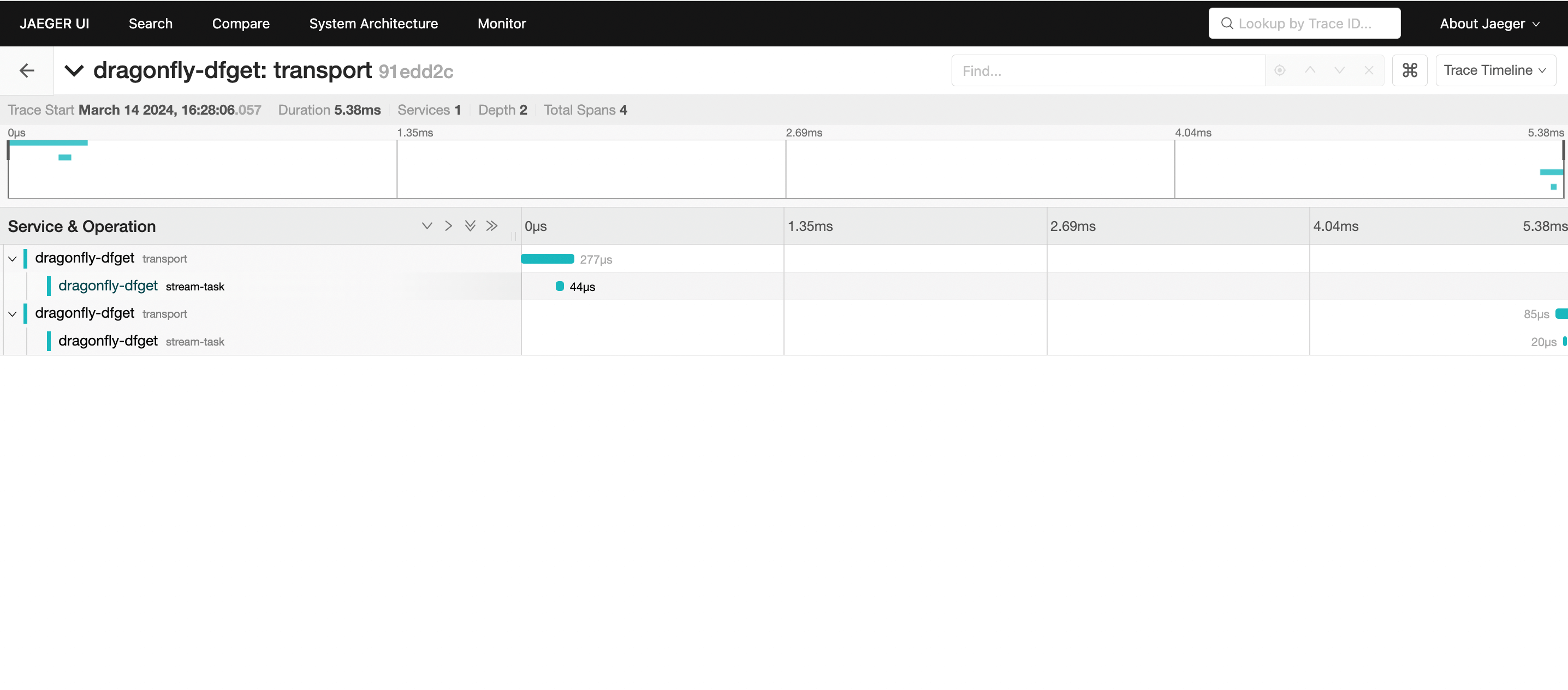
When pull image hits cache of local peer, it takes 5.38ms to download the
ceba1302dd4fbd8fc7fd7a135c8836c795bc3542b9b134597eba13c75d2d2cb0 layer.
Preheat image
Expose manager's port 8080:
kubectl --namespace dragonfly-system port-forward service/dragonfly-manager 8080:8080
Please create personal access Token before calling Open API, and select job for access scopes, refer to personal-access-tokens.
Use Open API to preheat the image alpine:3.19 to Seed Peer, refer to preheat.
curl --location --request POST 'http://127.0.0.1:8080/oapi/v1/jobs' \
--header 'Content-Type: application/json' \
--header 'Authorization: Bearer your_personal_access_token' \
--data-raw '{
    "type": "preheat",
    "args": {
        "type": "image",
        "url": "https://index.docker.io/v2/library/alpine/manifests/3.19",
        "filteredQueryParams": "Expires&Signature",
        "username": "your_registry_username",
        "password": "your_registry_password"
    }
}'
The command-line log returns the preheat job id:
{"id":1,"created_at":"0001-01-01T00:00:00Z","updated_at":"0001-01-01T00:00:00Z","is_del":0,"task_id":"group_e9a1bc09-b988-4403-bf56-c4dc295b6a76","bio":"","type":"preheat","state":"PENDING","args":{"filteredQueryParams":"","headers":null,"password":"","platform":"","tag":"","type":"image","url":"https://registry-1.docker.io/v2/library/alpine/manifests/3.19","username":""},"result":null,"user_id":0,"user":{"id":0,"created_at":"0001-01-01T00:00:00Z","updated_at":"0001-01-01T00:00:00Z","is_del":0,"email":"","name":"","avatar":"","phone":"","state":"","location":"","bio":"","configs":null},"seed_peer_clusters":null,"scheduler_clusters":[{"id":1,"created_at":"2024-03-12T08:39:20Z","updated_at":"2024-03-12T08:39:20Z","is_del":0,"name":"cluster-1","bio":"","config":{"candidate_parent_limit":4,"filter_parent_limit":15},"client_config":{"load_limit":200},"scopes":{},"is_default":true,"seed_peer_clusters":null,"schedulers":null,"peers":null,"jobs":null}]}
Polling the preheating status with job id:
curl --request GET 'http://127.0.0.1:8080/oapi/v1/jobs/1' \
--header 'Content-Type: application/json' \
--header 'Authorization: Bearer your_personal_access_token'
If the status is SUCCESS, the preheating is successful:
{"id":1,"created_at":"2024-03-14T08:01:05Z","updated_at":"2024-03-14T08:01:29Z","is_del":0,"task_id":"group_e64477bd-3ec8-4898-bd4d-ce74f0f66564","bio":"","type":"preheat","state":"SUCCESS","args":{"filteredQueryParams":"Expires\u0026Signature","headers":null,"password":"liubo666.","platform":"","tag":"","type":"image","url":"https://index.docker.io/v2/library/alpine/manifests/3.19","username":"zhaoxinxin03"},"result":{"CreatedAt":"2024-03-14T08:01:05.08734184Z","GroupUUID":"group_e64477bd-3ec8-4898-bd4d-ce74f0f66564","JobStates":[{"CreatedAt":"2024-03-14T08:01:05.08734184Z","Error":"","Results":[],"State":"SUCCESS","TTL":0,"TaskName":"preheat","TaskUUID":"task_36d16ee6-dea6-426a-94d9-4e2aaedba97e"},{"CreatedAt":"2024-03-14T08:01:05.092529257Z","Error":"","Results":[],"State":"SUCCESS","TTL":0,"TaskName":"preheat","TaskUUID":"task_253e6894-ca21-4287-8cc7-1b2f5bcd52f5"}],"State":"SUCCESS"},"user_id":0,"user":{"id":0,"created_at":"0001-01-01T00:00:00Z","updated_at":"0001-01-01T00:00:00Z","is_del":0,"email":"","name":"","avatar":"","phone":"","state":"","location":"","bio":"","configs":null},"seed_peer_clusters":[],"scheduler_clusters":[{"id":1,"created_at":"2024-03-14T07:37:01Z","updated_at":"2024-03-14T07:37:01Z","is_del":0,"name":"cluster-1","bio":"","config":{"candidate_parent_limit":4,"filter_parent_limit":15},"client_config":{"load_limit":200},"scopes":{},"is_default":true,"seed_peer_clusters":null,"schedulers":null,"peers":null,"jobs":null}]}
Pull alpine:3.19 image in kind-worker node:
docker exec -i kind-worker /usr/local/bin/crictl pull alpine:3.19
Expose jaeger's port 16686:
kubectl --namespace dragonfly-system port-forward service/dragonfly-jaeger-query 16686:16686
Visit the Jaeger page in http://127.0.0.1:16686/search, Search for tracing with Tags
http.url="https://index.docker.io/v2/library/alpine/blobs/sha256:ace17d5d883e9ea5a21138d0608d60aa2376c68f616c55b0b7e73fba6d8556a3?ns=docker.io":
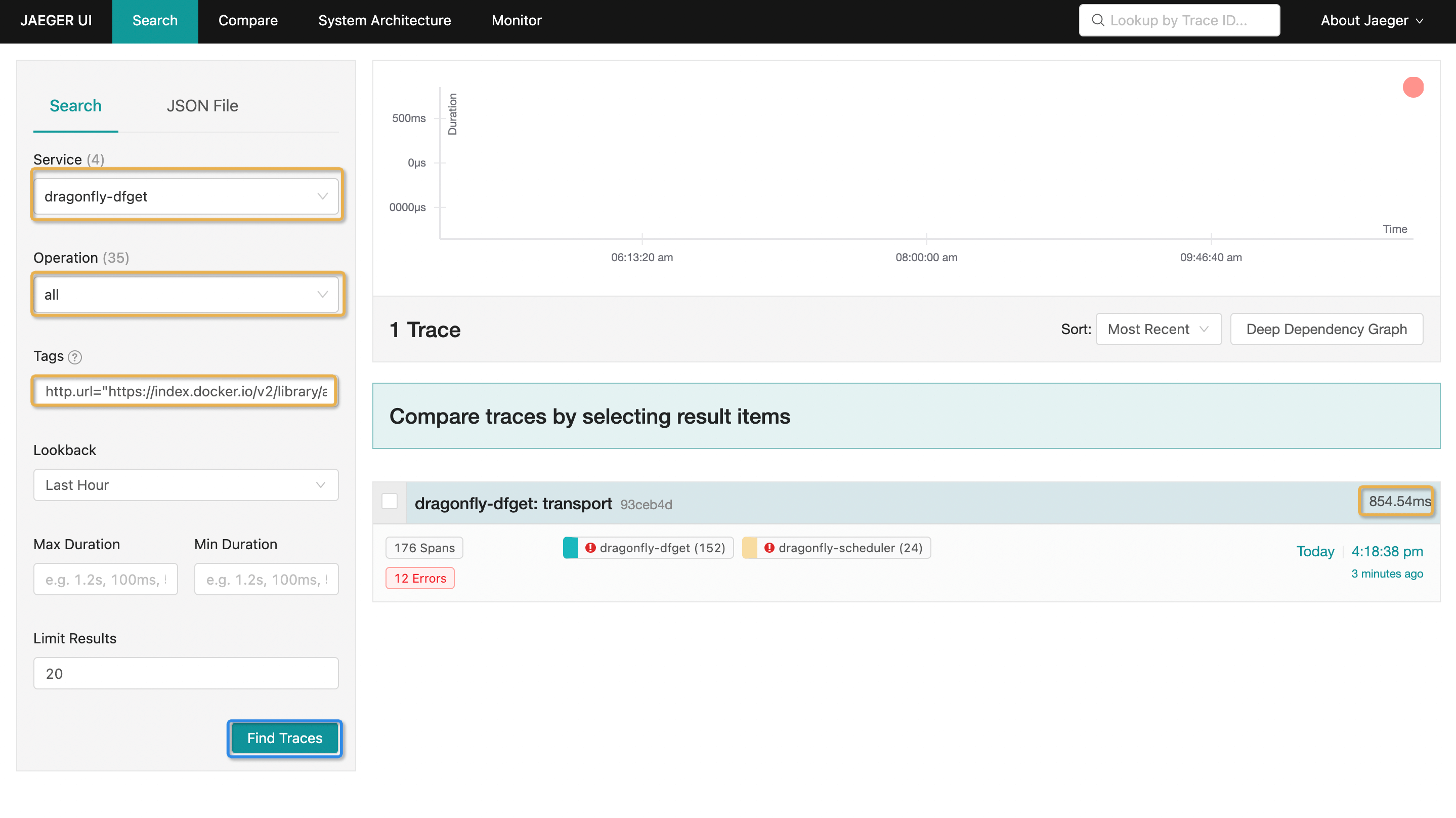
Tracing details:
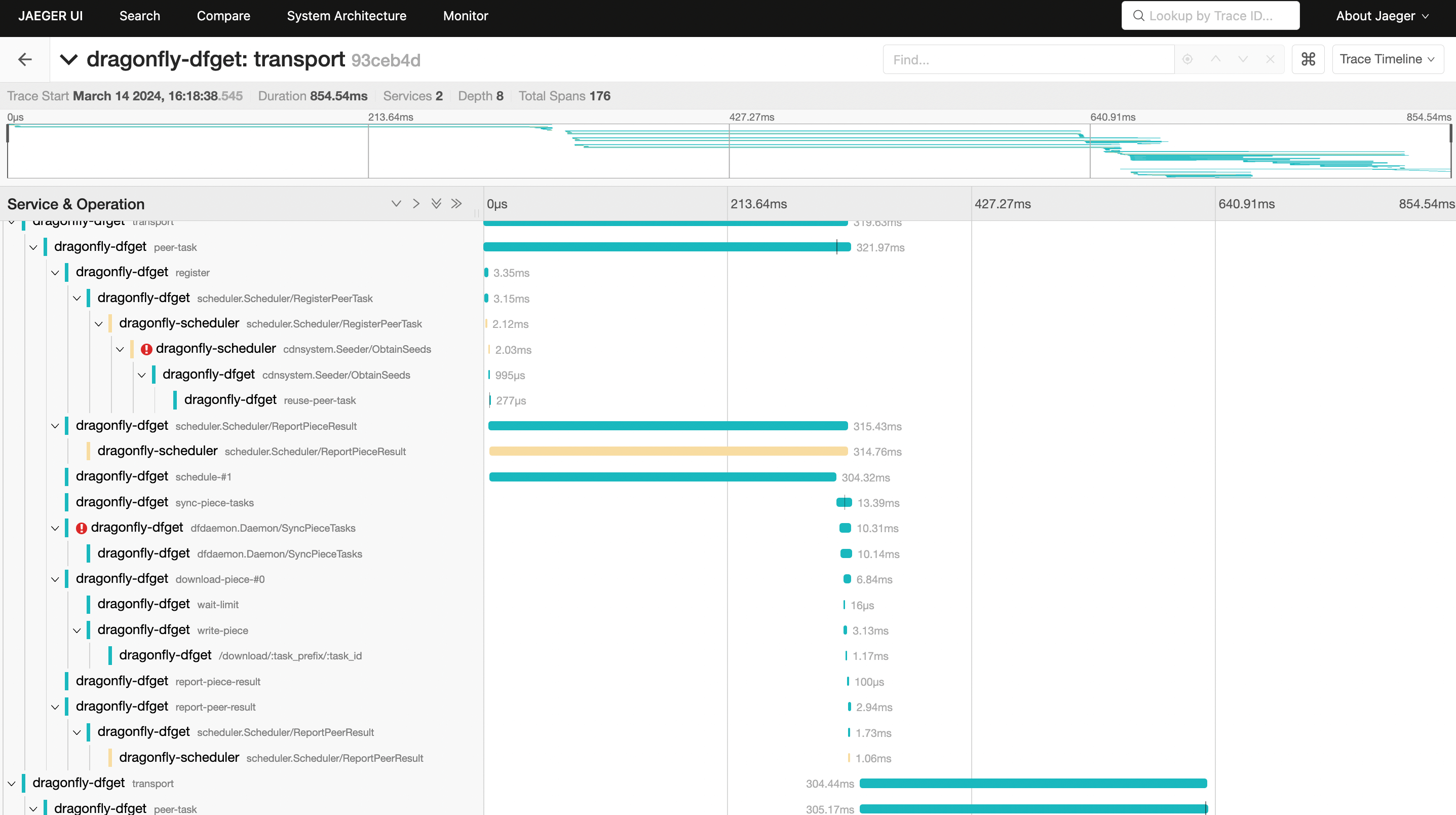
When pull image hits preheat cache, it takes 854.54ms to download the
ceba1302dd4fbd8fc7fd7a135c8836c795bc3542b9b134597eba13c75d2d2cb0 layer.